
UniFi Access vs Axis Network Door Controllers: What Should You Choose in 2026?

The camera brand on your site may be the least useful place to start when choosing a door controller. In the unifi access vs axis communications network door controllers comparison, the better fit depends on your doors, existing equipment, network and security workflows, not a broad claim about which brand is best.
It’s understandable to focus on familiar cameras or a straightforward management platform. But a controller also needs to work with the readers and locks at each door and suit the way your site manages access. Compatibility, integration options and plans for future expansion are key parts of the decision.
This guide explains what door controllers do, how UniFi Access and Axis differ, and what to assess before choosing a system. You’ll also learn how to plan an installation around your property’s wider security and electrical setup. Professional access-control installation can help translate your requirements into a workable design, so you can choose based on your needs rather than assumptions about camera systems.
Table of Contents
UniFi Access vs Axis Door Controllers: What Is Being Compared?
Cameras monitor activity. Door controllers manage whether access is authorised. They have different roles, even when they form part of the same property security setup. A comparison of UniFi Protect and Axis cameras can’t, by itself, tell you whether UniFi Access or an Axis network door controller will suit your doors.
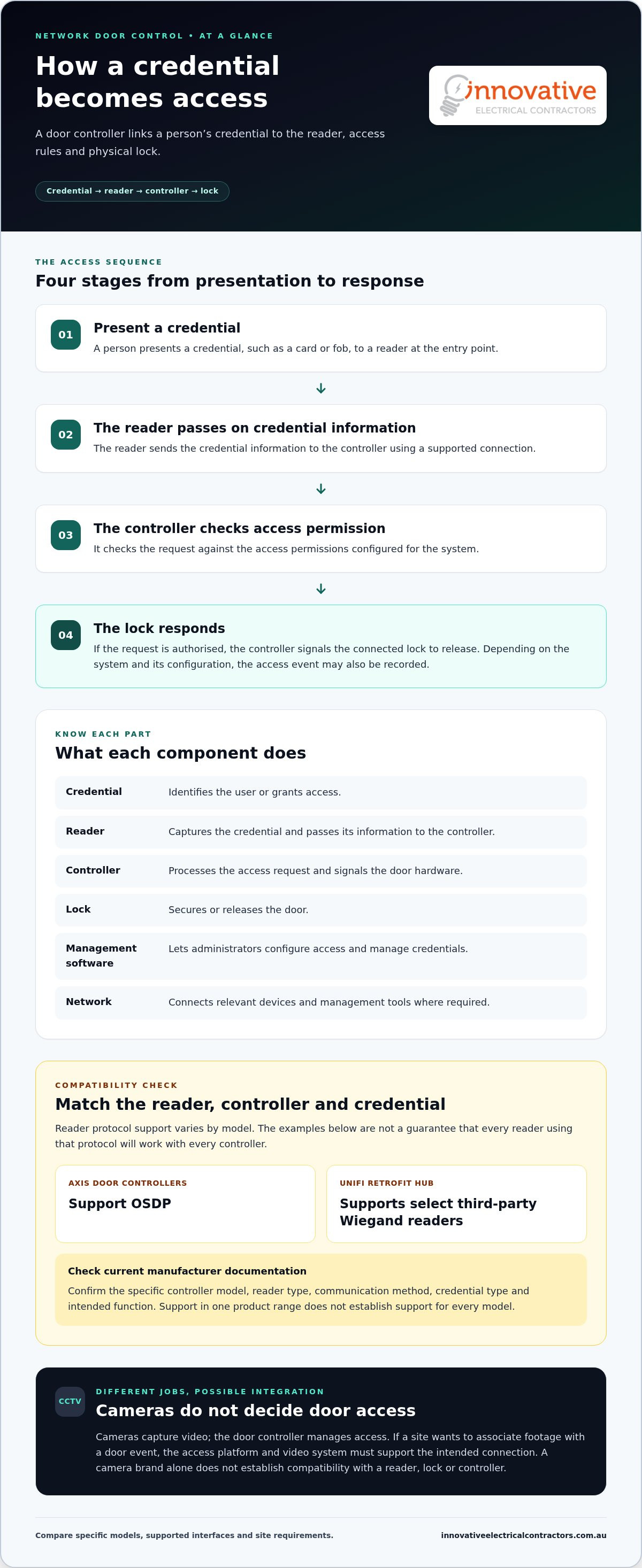
A network door controller coordinates access decisions and door hardware. It connects to readers at entry points, electric locks and access management software. Administrators use the software to configure access and manage credentials. The controller processes access requests and signals the lock to release when a request is approved. The exact behaviour depends on the system and its configuration.
UniFi Access and Axis Communications each offer access-control platforms, but capabilities can vary between controller models, readers and software. For background on the company, see the Axis Communications Wikipedia page. The useful comparison isn’t which brand also makes cameras. It’s how each option fits your doors, integrations and day-to-day operating needs.
What does a network door controller do?
Think of the controller as the link between a person’s credential and the physical door. A person presents a credential to a reader. The system checks whether that person has permission under the configured access settings. If approved, the controller signals the connected lock to release. Depending on the system’s capabilities and setup, it may also record the access event.
Each component has a distinct job: the reader captures the credential, the controller handles the access decision and door signal, the lock secures or releases the door, and the management software is used to administer access. The network connects relevant devices and management tools. CCTV has a separate role: cameras capture video, while recording, analytics and camera management belong to the video system, not the door controller.
Why a CCTV comparison cannot settle an access-control decision
UniFi Protect and Axis video products may be relevant when planning how video and door events should work together. But a camera’s features or its connection to video software don’t establish that a particular reader, lock or door controller will integrate with it. Compatibility depends on the specific devices, supported interfaces and intended functions.
For example, a site might want to associate recorded footage with a door event. That involves more than choosing a camera brand: the access platform and video system must support the intended connection. Check current manufacturer documentation for each controller model, reader type, communication method, software capability and integration limit. Don’t assume support in one product range applies to every model.
For the unifi access vs axis communications network door controllers comparison, start with a clear inventory of the doors and equipment you need to support. Then assess how each platform handles the required access tasks and fits your existing security setup. Careful planning and professional access-control installation help turn those requirements into a workable design.
How UniFi Access and Axis Door-Control Systems Work
A door controller receives access information, applies configured authorisation rules and signals the door hardware to respond. It sits between the credential reader and lock, while access management software gives administrators a way to set permissions and review system activity. The network connects the system’s components where required, but it doesn’t replace the controller’s role in managing door access.
The process follows a practical sequence:
A person presents a credential, such as a card or fob, to a reader.
The reader passes the credential information to the controller using a supported connection.
The controller checks the request against the access permissions configured for the system.
If authorised, the controller signals the lock to release. Depending on the configuration, the platform may record the event for later review.
Keep the parts distinct. A credential identifies the user or grants access; a reader captures that credential; the controller processes the request; the lock secures or releases the door; and the management interface is where administrators configure access. The network supports communication between relevant components. Together, these elements make up the door-control system, separate from CCTV recording and camera management.
Readers, credentials and door hardware
Reader choice affects how credentials reach the controller. OSDP and Wiegand are examples of reader communication protocols, but support varies by model. Axis door controllers support OSDP, while UniFi’s Retrofit Hub supports select third-party Wiegand readers. That doesn’t mean every reader using either protocol will suit every controller. Match the reader, controller and credential type using current manufacturer documentation.
Then consider the door itself. Lock type, existing hardware and how the entry is used all shape the installation design. A reader that works with a controller still needs to suit the credential plan and physical door. Assess these details together rather than treating the controller as a standalone purchase.
Software, network and event management
Administrators use the platform’s management interface to organise users, assign permissions and manage access events. Available controls and records vary by system and model. For example, an office might need different permissions for staff and visitors, while a site with several entry points may need access activity organised in a way that’s useful for its team.
Include network layout and power in the plan. Map where the controller and readers will sit, how they’ll connect, and what infrastructure supports the locks. UniFi Access requires a UniFi control hub, and its readers and hubs must be on the same Layer 2 network. For Axis, consult the Axis Communications Network Door Controllers documentation for model-specific details. Offline behaviour and event handling depend on the selected equipment and configuration, so don’t assume every setup behaves the same way.
The unifi access vs axis communications network door controllers decision is easier when you map the full chain: credential, reader, controller, lock, software and network. A carefully planned access control installation can account for these components alongside your property’s wider security and electrical setup.
UniFi Access vs Axis: A Practical Door-Controller Comparison
There’s no useful winner without a site plan. The suitable controller depends on the site’s doors and integrations, as well as how administrators need to manage access now and as the property changes. Use the comparison below to identify your priorities, then match them to current manufacturer documentation for the specific models under consideration.
Compare the systems against your site requirements
Start with a door schedule. Record each entry, its lock and reader, who needs access, and any access times or user groups the site requires. Then map the existing equipment and systems that need to connect. This turns a broad brand comparison into a practical list of requirements.
Use current manufacturer documentation to validate door capacity, reader support, protocols and integrations. Don’t transfer a capability from one controller model to another, or assume a platform-level feature applies to every device. In the unifi access vs axis communications network door controllers comparison, verified model details are more useful than general brand labels.
When ecosystem fit matters more than brand reputation
An existing network or security setup can shape how straightforward a system is to administer and expand. A UniFi environment makes its required hub and network arrangements relevant to planning. Axis controller capacities provide options for different door counts, while reader and integration support still need to be checked at model level.
Keep camera-platform functions separate from access-controller functions. Video recording or camera analytics don’t establish reader compatibility or door capacity. If expansion is likely, consider how additional doors, user groups and integrations will affect the design. Careful site planning helps align the controller choice with the property’s wider security and electrical setup.
Common Concerns: Compatibility, Security and Future Expansion
A familiar camera brand doesn’t automatically make its door-control platform the right match. CCTV and access control have different jobs, and a mixed-brand setup needs to work across the specific devices and functions your site relies on. The useful question isn’t simply whether two brands can connect. It’s whether the proposed connection supports the task you need, such as associating door events with video or managing access through a particular interface.
Will UniFi Access or Axis work with existing equipment?
Start by recording the make and model of each existing reader, lock, camera and security system. Then review four compatibility points:
Reader protocol: Identify how each reader communicates and whether the selected controller supports that reader model.
Lock interface: Check that the controller’s supported outputs suit the lock and door hardware.
Software integration: Define what information or action needs to pass between systems, then verify that the exact products support it.
Network requirements: Account for device connections, network layout and any platform-specific requirements.
ONVIF is associated with interoperability between video products. It isn’t a universal compatibility guarantee for door controllers, readers or locks. A camera connection also doesn’t prove that access events can be linked to footage. For each proposed combination, use current manufacturer documentation to check supported models, interfaces and intended functions. This is especially important in a mixed-brand installation, where a connection may support one function but not another.
Can the system grow with a changing site?
Plan beyond the doors in use today. A site may add an entry, divide access between teams, change user groups or bring another building into its operations. These changes can affect controller capacity, network arrangements, administration and how separate locations are managed. Check the selected models and platform documentation before assuming a system can expand in a particular way.
Document likely changes alongside current requirements. Note possible new doors, who may need access, which existing systems must remain connected and whether management needs to cover one location or several. This gives the installation design a clear basis and helps prevent an initial decision from limiting later choices.
Include administration in security planning. Decide who can manage the system, how permissions are assigned and how access is reviewed. Consider whether the network design should separate security devices from other traffic, and include a process for managing software and firmware updates. These are planning measures, not a guarantee of security. The right approach depends on the equipment, configuration and site.
The unifi access vs axis communications network door controllers decision is strongest when it reflects documented requirements, verified integrations and a realistic expansion plan. Innovative Electrical Contractors installs access-control systems designed around your property and its existing equipment. Plan your access control installation with the team.
Plan a Door-Control Installation That Fits Your Property
A reliable installation starts with how people use the property, not just a choice between UniFi Access and Axis. A clear plan helps align the doors, credentials, network and security systems, while giving the installation team a practical basis for equipment selection and setup. It also makes it easier to resolve questions before work begins.
What to document before installation planning
Prepare a simple site record that captures how access needs to work now and what may change. Include each controlled door, its intended users, access periods and operational requirements. Add existing readers, locks, network equipment and CCTV components that may need to connect or remain in place. Note planned changes, such as new entry points or changes to how staff and visitors use the site.
For wider security planning, the CCTV installation guide can help put door access in context alongside video coverage. Keep the requirements specific: which doors need controlled access, who needs it, and what systems need to share information?
How professional installation supports a considered system
An access-control installer can turn that site record into a workable design. The process typically moves through planning, coordinating equipment and connections, installation, configuration and functional testing. Each step should relate to the agreed requirements, from checking that the right people can enter to confirming that the lock responds as intended.
Use this sequence to structure the planning:
Map the doors. Record each entry point, its purpose, existing hardware and the access behaviour it needs.
Document users. Group users by their access needs and note any relevant schedules or operating arrangements.
Identify integrations. List the readers, locks, CCTV equipment, network and other systems that need to work with the design. Check model-specific compatibility against current documentation.
Assess infrastructure. Review equipment locations, network connections, power and any electrical work needed to support the planned setup.
Plan commissioning. Set out how the installation will be configured and tested against the site requirements, including credentials, permissions, door operation and event records where applicable.
This methodical approach helps keep access control connected to the property’s wider security and electrical setup. If the project also involves broader electrical planning, modern electrical services may be relevant to the overall design.
Choosing between unifi access vs axis communications network door controllers is only one part of the job. A sound plan accounts for the actual doors, equipment and operating needs. Innovative Electrical Contractors installs access-control systems. Discuss your property’s requirements with the team to plan an installation around them.
Turn Your Site Requirements Into a Clear Plan
Turn your access needs into a practical site brief. Note which doors need control, how people use them and what existing equipment must remain part of the setup. That gives the design process a clear starting point, whether you’re weighing up unifi access vs axis communications network door controllers or planning a broader security upgrade.
Innovative Electrical Contractors provides access-control and CCTV installations, supported by electrical and commercial electrical services. Bringing these elements together helps account for your property’s security and electrical requirements as one considered project.
Discuss an access-control installation with our team and take the next step towards a system planned around your property.
Frequently Asked Questions
What is the difference between UniFi Access and Axis door controllers?
Both are used in access-control systems, but the practical difference comes down to the specific controller models and the equipment and software they support. UniFi Access is Ubiquiti’s access-control platform, while Axis Communications offers network door-control products. For the unifi access vs axis communications network door controllers decision, compare the requirements of each door, including its reader, lock and any required integrations. Camera features alone won’t settle the choice.
Can UniFi Access and Axis cameras work together?
They may work together for some purposes, but the required function and exact products determine what’s possible. For example, showing footage in response to a door event requires more than connecting a camera to a network. Check the camera, access platform and software versions for support of that workflow. ONVIF may help with video interoperability, but it doesn’t confirm that every access event or control function will work across systems.
Do network door controllers keep working if the network goes down?
Offline behaviour varies by controller, configuration and system design, so don’t assume what a door will do during an outage. Before installation, decide what each entry point should do if network connectivity is lost. Then check the selected controller’s documentation for local access decisions, event storage and reporting behaviour. These details can affect how the site plans for outages and how administrators review activity once connectivity returns.
Can I keep existing access cards when changing door controllers?
Possibly, if the new readers and controller support the technology and configuration used by the existing cards. Identify the card type and reader models before selecting replacement equipment. Replacing a controller while keeping readers may involve different compatibility checks from replacing both. Documenting the current setup helps establish which components may be reused and whether the credentials or reader arrangement may need to change.
Are UniFi Access and Axis door controllers compatible with every electric lock?
No. A lock must suit the controller’s supported outputs and the door’s hardware and operating requirements. The fact that a lock is electric, or that a controller supports access control generally, doesn’t establish compatibility. Record the lock’s make and model, relevant electrical requirements and door details, then compare these with the chosen controller’s documentation. Assessing the reader, controller and lock as one arrangement helps avoid designing around an incompatible component.
Can access control be integrated with CCTV?
Access control and CCTV can be coordinated, but the available functions depend on the selected platforms, models and integrations. A site might want staff to review footage alongside a door event, for example. Define what operators need to see or do, then verify and test that workflow with the actual equipment and software versions. This helps distinguish a useful, working integration from a connection that only shares limited information.


Comments