
Tesla Powerwall 3 vs Sigenergy Battery Storage System: Which Suits Your Home?

The battery with the bigger headline capacity isn’t automatically the better choice for your home. In a tesla powerwall 3 vs sigenergy battery storage system comparison, the right fit depends on how you’ll use stored energy, how your solar is configured and whether you may want to expand the system later. Specifications can be difficult to compare when they describe different parts of a system.
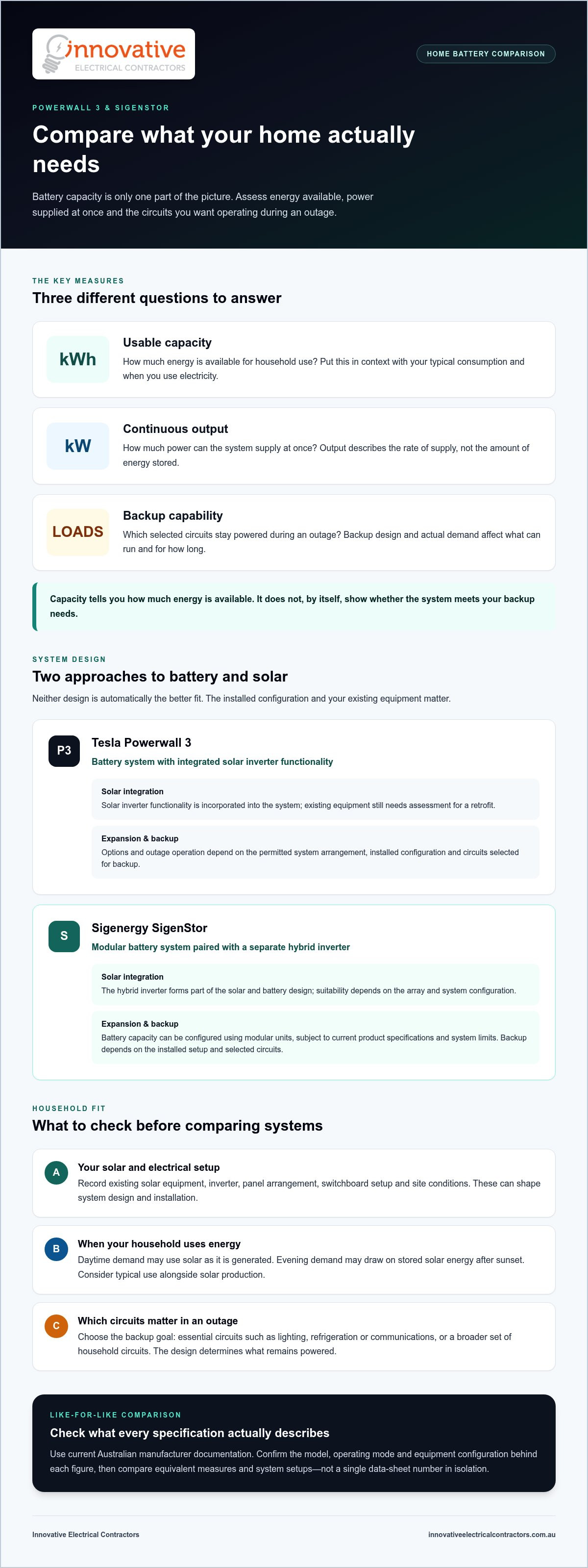
This guide focuses on the practical differences. Powerwall 3 combines its battery and inverter in one unit, while SigenStor has a modular design. We’ll look at how these approaches affect solar integration, backup planning, household circuits and future flexibility. You’ll also find out what information about your home, existing equipment and priority loads will help you assess the options. With those details in hand, you can compare systems against your household’s actual energy needs.
Table of Contents
Tesla Powerwall 3 vs Sigenergy: What Should You Compare First?
How Powerwall 3 and Sigenergy SigenStor Differ in System Design
Which System Fits Your Solar Setup, Backup Needs and Household?
A Practical Checklist for Comparing Powerwall 3 and Sigenergy
Plan a Battery Installation Around the System Your Home Needs
Tesla Powerwall 3 vs Sigenergy: What Should You Compare First?
Comparing Tesla Powerwall 3 with Sigenergy SigenStor can feel like comparing apples with oranges. They use different system architectures, and SigenStor configurations can vary. Before weighing up headline capacity or output, check that the figures describe the same measure and a comparable system configuration.
For this tesla powerwall 3 vs sigenergy battery storage system comparison, the focus is on Australian residential applications. Check current Australian manufacturer documentation for product-specific figures, including the model, operating mode and equipment configuration each figure applies to. Tesla’s product history and applications are outlined in the Tesla Powerwall Wikipedia overview, but current manufacturer specifications are the relevant reference when assessing a system for your home.
Start with three questions: how much energy can the battery store and make available, how much power can the system supply at once, and which circuits will stay powered during an outage? The battery, inverter, solar array and switchboard work together as one energy system. A specification for one component alone can’t tell you how the complete system will perform at home.
What does a home battery comparison need to measure?
Usable capacity, measured in kilowatt-hours (kWh), is the energy available for household use. Continuous output, measured in kilowatts (kW), describes the rate at which the system can supply power. These measures answer different questions: capacity relates to how much energy is available, while output relates to how much power can be supplied at once. Backup is a separate consideration. It concerns which circuits can operate during an outage and how long they can run under actual demand.
When comparing figures, check that they refer to the same conditions and system configuration. Operating modes, inverter setup and installed equipment can affect what a published number means in practice. Compare like with like rather than treating one data-sheet figure as a complete description of the system.
Why headline capacity does not settle the decision
Capacity matters in relation to your household’s daily routine. A home that uses more power in the evening may draw on stored solar energy after sunset. A household with daytime demand may use more solar as it is generated, leaving less available to charge a battery. Your typical usage, solar production and other consumption help put a capacity figure into context.
Backup depends on the loads selected for supply. Keeping essential circuits such as lighting, refrigeration or communications running is a different design goal from powering the whole home. Which circuits can be backed up depends on the system design and electrical configuration.
Battery capacity tells you how much energy is available, but it can’t show by itself whether the system will meet your home’s backup needs. Compare capacity, output and backup alongside your solar setup and switchboard. Then consider how the complete system fits your household’s energy use.
How Powerwall 3 and Sigenergy SigenStor Differ in System Design
The main difference is how each system combines battery storage, solar generation and power conversion. Tesla Powerwall 3 has an integrated solar inverter, while Sigenergy SigenStor uses a separate hybrid inverter with modular battery units. These approaches affect equipment layout and system design, but neither is automatically the better fit for every property.
This table summarises the broad design differences. Specific compatibility, expansion options and backup functions depend on the Australian product configuration and the system installed at the property.
Inverter design and solar integration
An inverter converts electricity into a form that household circuits, solar equipment and battery storage can use. Powerwall 3 incorporates solar inverter functionality into the battery system. SigenStor pairs battery modules with a separate hybrid inverter. These are different design approaches, not a direct measure of which system performs better.
If you already have solar, the current inverter, panel arrangement and other electrical equipment all matter. For a new installation, the solar array and battery can be designed together. Product documentation sets out supported configurations, while a site assessment shows how existing equipment may fit into a proposed system. Assess a retrofit using its actual components rather than assuming one design will suit every home.
Expansion, monitoring and backup configuration
SigenStor’s modular design provides a battery expansion pathway, subject to the relevant product specifications and system limits. For Powerwall 3, assess expansion against the manufacturer’s permitted arrangements rather than assuming future additions will be possible. If you may want to expand the system later, use current Australian documentation to understand the limits of the configuration you’re considering.
Compare monitoring and control features for the specific equipment and configuration. Don’t assume every feature applies across all system arrangements. Backup claims also need context: a system capable of backup won’t necessarily power every circuit in the home. Electrical integration, installed equipment and the circuits selected determine what can operate during an outage.
In brief, Powerwall 3 integrates the solar inverter, while SigenStor pairs modular batteries with a separate hybrid inverter. A tailored solar and battery installation can account for your existing equipment, future plans and backup priorities.
Which System Fits Your Solar Setup, Backup Needs and Household?
The right fit depends on what you need the battery to do and how your solar and electrical equipment are arranged. In the tesla powerwall 3 vs sigenergy battery storage system comparison, neither system is a universal winner. A new solar installation, a battery retrofit and a home prioritising outage backup each raise different design questions.
Start with your household’s energy pattern. If people are home during the day, they may use some solar generation as it is produced. If the home is usually empty, more daytime generation may be available to charge a battery for evening use. High evening demand, such as cooking, heating or cooling, can also influence the capacity and output you need. These patterns help define what the system must do before you compare product configurations.
If you are adding a battery to existing solar
Gather details of your current system before comparing options: panel arrangement, inverter make and model, and any relevant system documentation. Existing equipment affects how a battery connects to solar generation and how the complete system is configured. Compatibility isn’t determined by the battery name alone. Assess it against current manufacturer guidance and your home’s electrical setup.
For a new solar-and-battery project, the components can be considered together from the outset. For a retrofit, the design needs to account for what is already installed. Assessing the array, inverter and switchboard helps establish whether the proposed arrangement fits the property. Avoid relying on a general claim that one architecture is always easier to add to existing solar. For readers researching complete solar array and home battery installations in Europe, providers like zonnepanelen-brabant.nl illustrate how rooftop panels and battery storage can be planned together from scratch.
If backup power is your main priority
Write down the appliances and circuits you want to keep running during an outage. You might prioritise refrigeration, selected lights, internet equipment or medical equipment. Then consider which loads could operate at the same time. Total demand matters, and some appliances draw extra power when starting. The system’s documented backup functions and chosen configuration need to suit those requirements.
There’s a difference between backing up selected essential circuits and supplying the whole home. The result depends on the equipment, electrical integration and circuit arrangement. Don’t read a product comparison as a promise that every appliance will operate during every outage. A tailored design can identify the included loads and how the home is intended to operate when grid supply is unavailable.
Think ahead, too. If you expect to add major electrical loads or increase storage later, include those plans in the design discussion. Expansion pathways and limits vary by product configuration. Base future plans on current Australian manufacturer documentation rather than assuming equipment can be added without restriction.
Battery ownership involves more than choosing a system. Regular care and attention to operating conditions also matter, as covered in this solar battery maintenance guide. Matching the system to your solar setup, daily routine and backup priorities gives you a clearer basis for planning.
A Practical Checklist for Comparing Powerwall 3 and Sigenergy
A useful comparison starts with your home, not a product brochure. Use this checklist to organise the information needed for a suitable design and compare proposed systems on the same terms.
1. Document your current equipment. Record your solar panel and inverter details, including make and model where available. Note any existing battery equipment and keep system documents handy. This gives the design process a clear picture of what’s already installed.
2. Write down your priorities. Decide whether your main aim is to use more solar energy at home, manage evening demand or keep selected circuits operating during an outage. Note typical household usage and when energy demand is highest.
3. List backup loads and future plans. Identify the circuits and appliances you’d want to keep running, and note any major loads you may add. A planned electric vehicle, home extension or change in occupancy could affect future energy use, so include these considerations early.
4. Compare verified specifications and site design. Check current Australian manufacturer documentation for the proposed system configuration. Then assess how the solar array, inverter, battery, switchboard and backup circuits work together at your property.
Information to gather before comparing quotes
Make a simple record of your current solar equipment, the battery system under consideration and your household’s usual energy pattern. Add priority circuits, major appliances and the outage conditions you want the design to address. Separate essential loads from items you can do without temporarily. Include likely changes to the home or household that could increase or shift demand.
These details make the tesla powerwall 3 vs sigenergy battery storage system comparison more relevant to your circumstances. They also help clarify whether you’re planning a new solar-and-battery installation or adding storage to existing equipment.
How to compare proposed system designs fairly
Put the proposals side by side using consistent assumptions. Check that usable capacity is compared on the same basis, that backup loads are clearly identified and that solar generation assumptions reflect the same array and household usage. Review the listed components, operating modes and intended backup arrangement against current manufacturer documents. Don’t compare a headline product figure from one proposal with a complete installed configuration from another.
Installation scope matters as well. Existing equipment, switchboard conditions, electrical integration and the circuits selected for backup can all affect the system design. A clear proposal should show how these elements work together, rather than treating the battery as a standalone item. For broader context on how electrical work fits into property projects, see this guide to modern electrical services.
Use your checklist to shape a solar and battery installation around your equipment, priorities and future plans. Discuss your solar and battery installation with Innovative Electrical Contractors.
Plan a Battery Installation Around the System Your Home Needs
Once you’ve compared the systems, plan how a battery will work with your property’s electrical setup. The process should connect your priorities with existing equipment, site conditions and intended backup use, rather than treating the battery as a standalone purchase. This applies whether you’re weighing up the tesla powerwall 3 vs sigenergy battery storage system or planning another solar and battery configuration.
A well-planned project generally moves through three stages:
Assess: Review the site, existing solar equipment, electrical setup and household loads. Identify the circuits you want to support during an outage.
Design: Select a system configuration for the property and intended use. Account for solar integration, switchboard conditions and the proposed backup arrangement.
Install and commission: Complete the electrical integration, configure the system and commission it in line with the applicable product documentation.
Installation scope depends on the complete design. Existing equipment may affect how the battery integrates with solar, while the switchboard and selected backup circuits influence the electrical work involved. Assessing these details helps align the planned system with the property, instead of making assumptions based on product specifications alone.
What happens during system assessment and design?
Assessment brings together the information that shapes the proposal: the property, existing solar equipment, household energy use and intended backup operation. The design sets out the system configuration and how its components connect. Your priorities guide those choices. A home focused on essential backup circuits may need a different arrangement from one planning a new solar installation and future changes in energy use.
Innovative Electrical Contractors installs solar and battery systems for residential and commercial projects, alongside electrical contracting work. Bringing equipment selection, integration and installation together helps keep the project focused on the whole system.
From installation to ongoing ownership
After installation, commissioning sets the system up for operation. The handover should explain how to use the installed system and where to find its product documentation. Monitoring options and maintenance guidance can vary by equipment and configuration, so follow the instructions supplied for your system. Clear handover information helps you understand normal operation and find relevant guidance later.
With the design, installation and handover planned together, you can move forward with a system matched to your property and priorities. For a residential or commercial project, discuss a solar and battery installation with Innovative Electrical Contractors.
Turn Your Battery Comparison Into a Clear Plan
Your comparison is most useful when it becomes a clear brief for what you want your home’s energy system to do. Rather than choosing by brand alone, decide what a successful outcome looks like: using more solar at home, having selected circuits available during an outage or allowing for changing energy needs. This gives the tesla powerwall 3 vs sigenergy battery storage system decision a practical purpose and keeps the design focused on your property.
Before taking the next step, gather your current system details and note your priorities. A clear starting point makes it easier to plan how the equipment, electrical setup and intended use can come together. The same considered approach applies to residential and commercial projects, including off-grid systems incorporating solar, batteries and generators.
Ready to turn your requirements into a considered system design? Discuss a tailored solar and battery installation with Innovative Electrical Contractors.
Frequently Asked Questions
Is Tesla Powerwall 3 better than a Sigenergy battery?
Neither system is universally better. The tesla powerwall 3 vs sigenergy battery storage system decision depends on verified specifications, your existing solar equipment, backup priorities, system configuration and household energy use. A home adding a battery to an established solar setup has different design considerations from a property planning new solar. Assess each option against your home’s needs rather than brand reputation alone.
Can Tesla Powerwall 3 and Sigenergy work with existing solar panels?
They may suit some existing solar setups, but compatibility depends on the installed inverter, panel array configuration and proposed battery design. For example, the existing inverter arrangement can affect how solar generation connects with battery storage. General system possibilities don’t guarantee that a particular product configuration will suit your property. Consider current manufacturer documentation alongside the home’s electrical setup as part of a complete system assessment.
How much storage do I need for a home battery?
The right storage capacity depends on when your household uses energy, how much solar generation is available, evening demand and the backup loads you want to support. Review your electricity use across the day and note which appliances run after sunset. A household with high evening use may have different priorities from one that uses more energy during daylight hours. Don’t choose capacity from a headline figure alone.
What happens if the power goes out with a home battery?
A home battery can supply power during an outage only if the system is configured for backup. Which circuits continue operating depends on the installation, system settings and energy available in the battery. A setup may support selected essentials, such as refrigeration and lighting, rather than every circuit. Understand how the intended backup arrangement is designed and operated. Don’t assume every appliance will stay on when grid power is interrupted.
Can a Sigenergy battery or Powerwall 3 be expanded later?
Potential expansion depends on the product, installed configuration, site design and current manufacturer requirements. Before choosing a system, include likely future demand, such as a new appliance or other electrical load, in the original design discussion. Expansion isn’t automatic, and additional equipment may need to follow specific product limits. Use current Australian manufacturer documentation to verify supported expansion arrangements for the exact system being considered.
Do I need solar panels to install a home battery?
Home batteries are commonly paired with solar, but the charging arrangement depends on the product’s capabilities, system design and what you want the battery to do. A household aiming to store surplus solar has different considerations from one assessing other available charging options. The assessment should account for existing equipment, energy use and intended operation. Consider solar generation and battery charging together rather than assuming one setup suits every property.
Which is better for backup power, Tesla Powerwall 3 or Sigenergy?
Brand name alone can’t establish which system will provide better backup for your home. Compare documented output, supported configuration and backup functions against the circuits and appliances you want to operate. A refrigerator, lights and a high-demand appliance create different requirements from a short list of essential loads. Check current Australian specifications for the proposed configuration, and don’t assume either system will power the entire home in every installation.


Comments